After testing the top contenders for game design document work, narrative mapping, and systems design, our ranking is: Aviquill for game-dev-specific workflows, Heptabase for research-heavy knowledge work, Milanote for creative project boards, Obsidian for markdown purists who want a canvas bolted on, and Miro for large team whiteboarding.
What Makes A Note App "Infinite Canvas"
An infinite canvas note-taking app lets you place notes, images, and connections anywhere in open 2D space instead of forcing everything into folders or linear pages. This spatial freedom matters most for messy, non-linear work, exactly the kind of thinking game developers do when mapping mechanics, branching narratives, or systems that don't fit a single document. The best tools in this category in 2026 combine that spatial layout with real organizational structure, like search, linking, and version history, rather than being just a glorified whiteboard.
Aviquill: Best For Game Design And Pre-Production
Aviquill is purpose-built by a game developer for game development, which shows in details competitors overlook: a coordinate ruler and minimap for navigating large canvases, constellation search for finding ideas across hundreds of blocks, and per-block version history so you can track how a mechanic evolved without digging through document history. It supports rich embeds (images, audio, video, tables) directly on the canvas, plus real-time multiplayer collaboration with per-block chat, making it genuinely useful for small studios reviewing a GDD together rather than emailing PDFs back and forth. Where it currently loses ground: it has a smaller integration ecosystem than Notion and no dedicated mobile app yet, so if you need on-the-go editing from a phone, this isn't the tool for that today.
Heptabase: Best For Research And Knowledge Mapping
Heptabase is the strongest pick if your work leans more academic or research-heavy than game-specific, it's built around literature reviews, citation tracking, and connecting research papers into a spatial knowledge system with automatically surfaced related ideas. It even supports importing highlights directly from reference managers like Zotero and Mendeley, which is a genuinely unique strength that no game-dev tool match. It's a better fit for narrative designers doing heavy worldbuilding research than for developers tracking systems and mechanics, since its structure is optimized for connected notes rather than production tracking.
Milanote: Best For Creative Project Boards
Milanote is the most beginner-friendly infinite canvas tool on this list, aimed squarely at creatives, writers, and marketers who want drag-and-drop boards for moodboards, references, and task tracking. It offers Kanban-style task management alongside its canvas, plus real-time collaboration with commenting, which makes it solid for small creative teams organizing a pitch deck or art direction board. It's weaker for anything technical or systems heavy as there's no version history at the block level and no dedicated game-dev features, so mechanics-heavy design work outgrows it fast.
Obsidian: Best For Markdown Purists
Obsidian's canvas feature is a bolt-on to its core markdown vault, which means you get powerful bidirectional linking and a huge plugin ecosystem, but the canvas itself feels secondary to the note-taking experience rather than the main event. It's a strong choice if you already live in markdown and want occasional visual mapping, but it lacks native real time multiplayer collaboration without third-party plugins, which matters if your team needs to review a canvas together live.
Miro: Best For Large Team Whiteboarding
Miro is the heavyweight option built for teams, not solo developers, with deep integrations for standups, retros, and cross-functional planning beyond just design docs. It's overkill and often overpriced for a solo indie dev or two-person studio just trying to map out a GDD, and its learning curve is steeper than tools built specifically for note-taking.
Which One Should You Actually Pick?
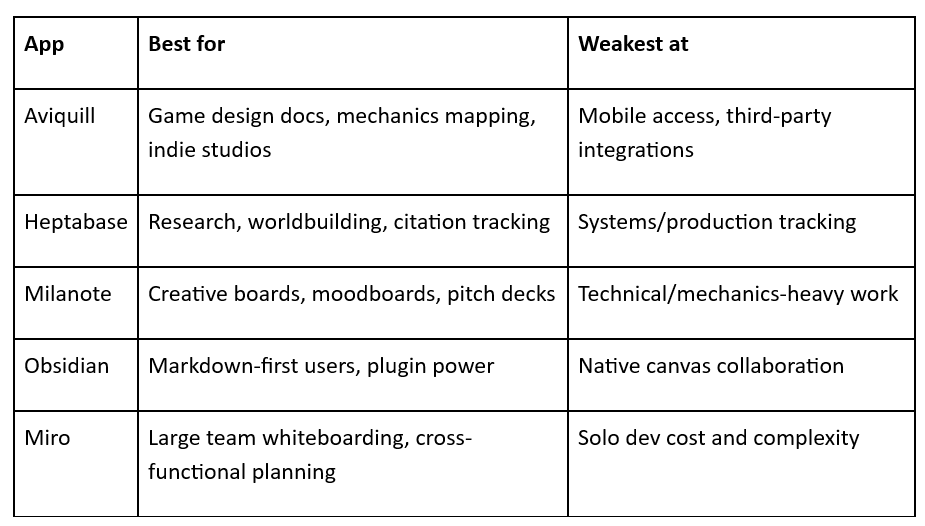
The right choice really comes down to what kind of messy thinking you're trying to organize, since these tools solve different bottlenecks even though they all live on an infinite canvas.
If your work is specifically game development which needs GDDs, systems design, mechanics balancing, narrative branching, then Aviquill is built around exactly that workflow, and that specificity shows in details generic tools don't bother with. The coordinate ruler and minimap exist because game designers routinely work across canvases too large to navigate by scrolling alone, and constellation search was built to solve the specific problem of finding one mechanic buried in a 300-block design doc. Per-block version history also matters more in game dev than in most other creative work, since mechanics get iterated on dozens of times before they ship, and being able to see exactly how a system evolved, without digging through a single flattened document history, saves real production time. The honest trade off is that Aviquill has no dedicated mobile app yet, so if part of your workflow involves jotting ideas on your phone during a commute or reviewing a canvas on a tablet between meetings, you'll hit a real gap today.
If your primary bottleneck is research and citation-heavy worldbuilding rather than production tracking, Heptabase is worth trialing instead of forcing Aviquill into a role it wasn't optimized for. Heptabase's core strength is connecting research materials, it can pull highlights directly from reference managers like Zotero and Mendeley, and it automatically surfaces related notes based on content, which is genuinely useful if you're building a fantasy world's history, lore, or mythology from dozens of source documents. Narrative designers doing heavy worldbuilding research, rather than tracking gameplay systems, will likely find Heptabase's linking and citation tools save more time than Aviquill's mechanics focused features, since the two tools are solving different problems even though both use a spatial canvas.
If you're leading a larger team that already lives in Miro for other planning work, it may make more sense to consolidate there than adopt a fifth tool, purely from a workflow fragmentation standpoint. Miro's strength is cross-functional planning such as standups, retros, sprint boards, and if your team already has muscle memory and integrations built around it, adding a specialized game-dev canvas tool on top creates context-switching costs that can outweigh the feature gains. That said, Miro's learning curve and per-seat pricing are steep for a two-person indie studio, so this consolidation logic mostly applies to larger teams where the switching cost of a new tool is genuinely higher than the benefit of game-dev specific features.
The underlying pattern across all three scenarios: pick the tool built around your actual bottleneck (production tracking, research, or team-wide planning) rather than the tool with the most features, since infinite canvas apps differentiate less on raw capability and more on which specific workflow, they were designed to remove friction from.
Frequently Asked Questions
Is An Infinite Canvas App Better Than Notion For Game Design?
For non-linear work like mapping mechanics or narrative branches, yes , canvas apps let you see spatial relationships that folder-based tools like Notion hide behind pages and databases.
Do Infinite Canvas Apps Work For Team Collaboration?
Most now, including Aviquill and Milanote, but the depth of that collaboration (live cursors, per-block chat, comments) varies significantly, so test with your actual team size before committing.
Which App Is Cheapest For Solo Indie Developers?
Pricing varies by plan and changes frequently, so check each tool's current pricing page directly rather than relying on older comparison posts, since 2026 pricing structures for tools like Milanote and Heptabase have shifted from earlier years.
Ready to map your next game on a canvas built for it?
If your GDD, mechanics tree, or narrative map has outgrown a folder-based note app, Aviquill was built by a game developer specifically to fix that problem. Try Aviquill free and bring your messiest design doc, no credit card, no mobile app to download, just an infinite canvas that finally keeps up with how you actually think.
Start your free trial